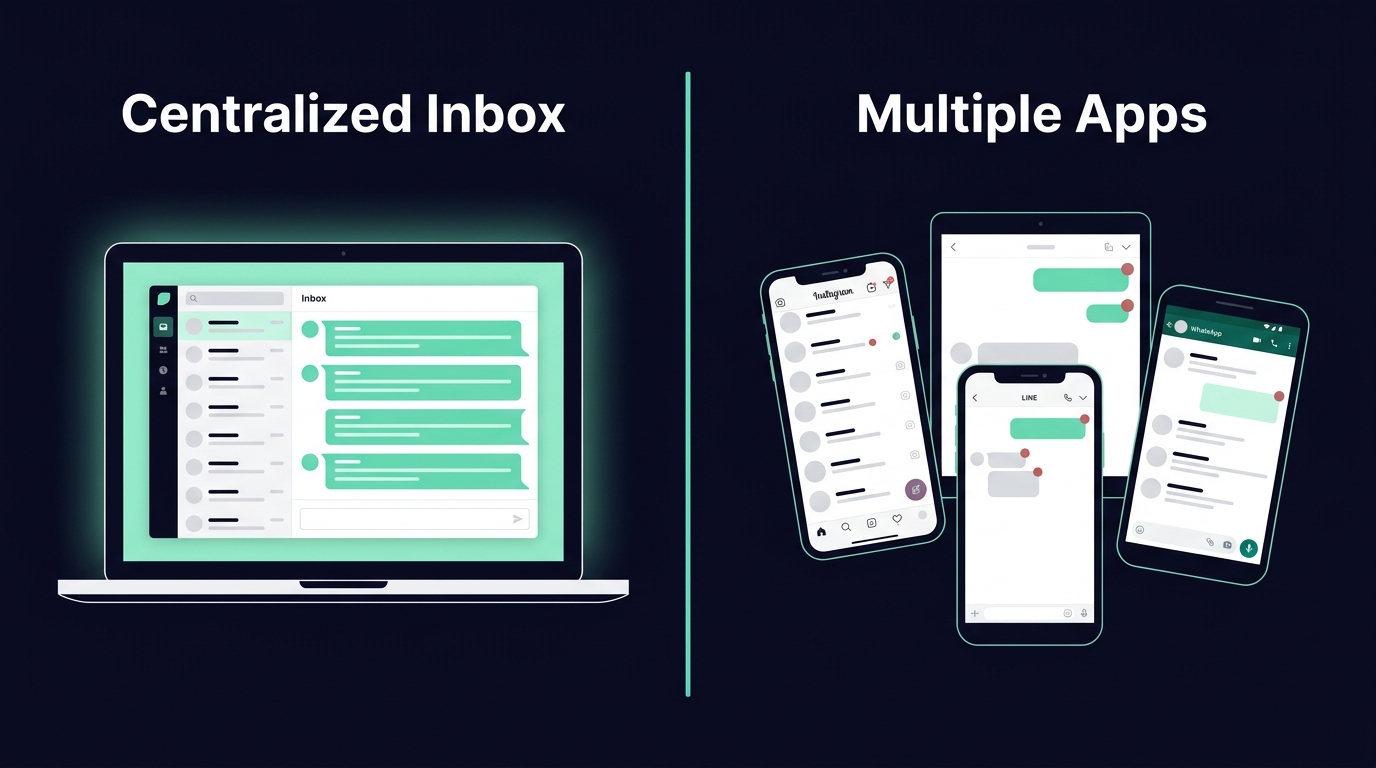
Centralized Inbox vs Multiple Apps
Centralized Inbox vs Multiple Apps: Which is Better?
Managing customer messages across multiple platforms can be overwhelming. Thai businesses often juggle LINE OA, Instagram, Facebook Messenger, and WhatsApp, which slows response times and creates inefficiencies. A centralized inbox solves this by combining all channels into one interface, improving productivity and customer satisfaction.
Key Takeaways:
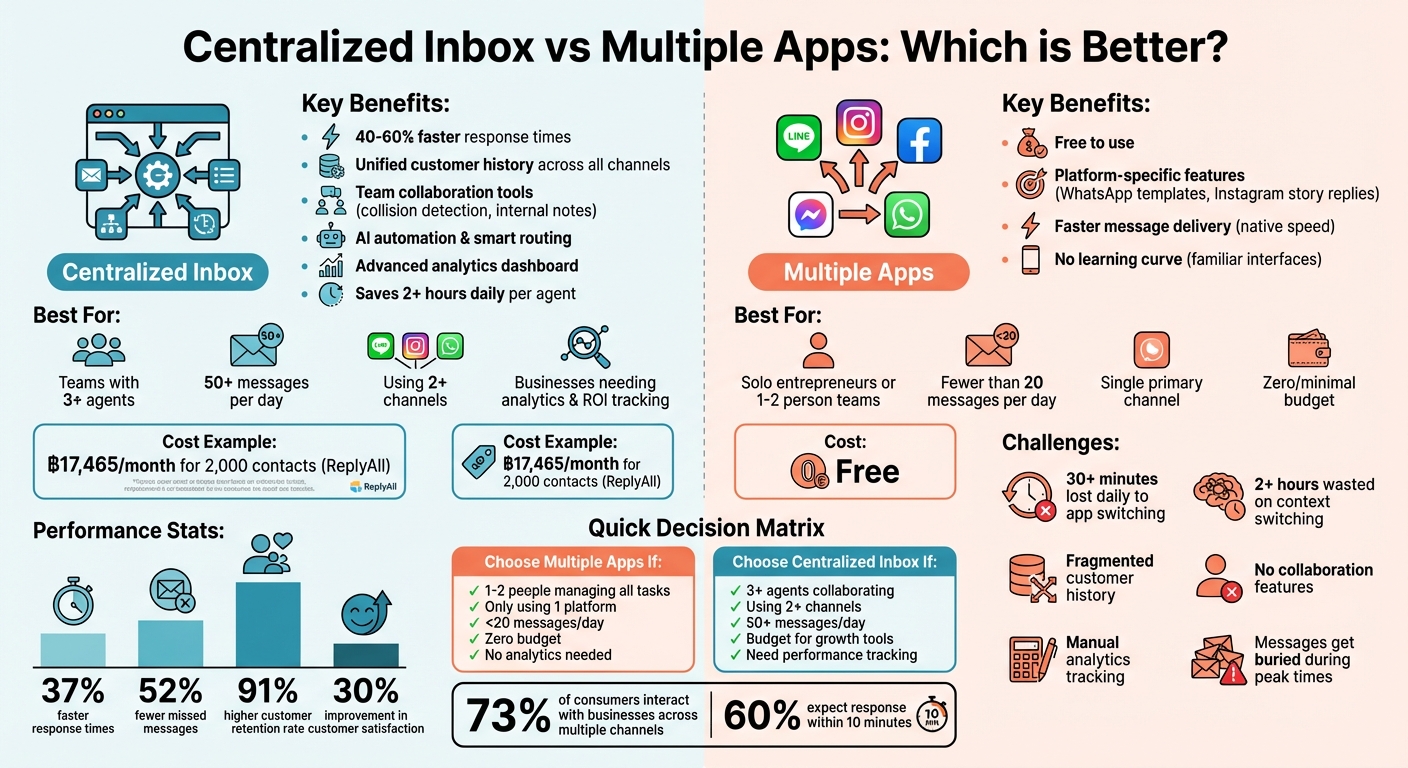
- Centralized Inbox: Speeds up responses (40–60% faster), reduces missed messages, and simplifies workflows. However, setup costs and training are required.
- Multiple Apps: Great for small teams or low message volumes. But as businesses grow, context switching wastes time, and fragmented customer history leads to poor experiences.
Quick Comparison:
| Criteria | Centralized Inbox | Multiple Apps |
|---|---|---|
| Ease of Use | Single dashboard for all channels | Separate logins for each platform |
| Response Time | Faster due to unified view | Slower due to app switching |
| Cost | ฿17,465/month for 2,000 contacts (ReplyAll) | Free |
| Scalability | Handles high volumes with automation | Limited as volume grows |
| Customer Experience | Unified history avoids repetition | Fragmented interactions |
For small teams with light message volumes, multiple apps may suffice. But if you’re scaling or handling over 50 daily messages, a centralized inbox can save time and boost efficiency.
Centralized Inbox: Benefits, Drawbacks, and Capabilities
A centralized inbox brings all your customer communication - LINE OA, Instagram DMs, Facebook Messenger, WhatsApp Business, and email - onto a single dashboard. Instead of juggling five different apps, your team can manage everything in one place. This eliminates the constant switching between platforms, known as the “toggle tax”, which research shows costs knowledge workers an average of 23 minutes of productivity every time they switch contexts between apps.
Benefits of a Centralized Inbox
The most obvious benefit is speed. Teams using a centralized inbox respond 40–60% faster, often cutting first-response times from hours to under 30 minutes. On average, agents save over 2 hours daily by not having to check multiple messaging apps. For example, in 2025, an e-commerce support team moved from using separate apps for WhatsApp, Gmail, and Instagram to a unified inbox. Before the switch, three agents managed 200 daily conversations with an average response time of 2.5 hours and an 8% missed-message rate. After centralizing, two agents handled the same volume, response times dropped to 18 minutes, and missed messages were almost eliminated.
Another major advantage is having a complete view of customer interactions. If a customer messages your business on Instagram today and follows up on LINE tomorrow, your team can see the entire conversation history in one place. This eliminates the need to ask repetitive questions like, “Can you repeat your order number?” This seamless experience is critical, especially since 73% of consumers interact with businesses across multiple channels.
Collaboration tools within centralized inbox platforms also improve efficiency. Features like collision detection show when another agent is already replying to a message, while internal notes and @mentions make team coordination smoother.
Mark, a Sales Director, shared, “Before our unified inbox, I ended each day feeling scattered. Now I feel in control. I know I’ve seen everything important, and I can actually relax when I log off”.
Automation and AI tools simplify repetitive tasks. Auto-routing can distribute messages through round-robin or load-balanced systems, while AI-powered reply suggestions and canned responses ensure replies remain personal. For instance, ReplyAll Chat offers smart suggestions that help teams handle more conversations without needing additional staff. Analytics dashboards also give managers detailed insights into performance metrics like response times and resolution rates across all channels.
Training new hires becomes easier too, as they only need to learn one interface instead of mastering multiple platforms. Businesses with strong omnichannel strategies report a 91% higher year-over-year customer retention rate, and implementing a centralized inbox can improve customer satisfaction scores by up to 30%.
That said, while the benefits are clear, there are also challenges to consider.
Drawbacks of a Centralized Inbox
The setup process for a centralized inbox can be complex. Connecting multiple APIs often requires technical expertise. For example, integrating the WhatsApp Business API involves Meta’s approval process, which can take 24–48 hours. Some platforms rely on third-party integrations rather than native APIs, which may slow message delivery or limit features like Instagram story replies or WhatsApp templates.
Adjusting to a centralized system also requires training. Shifting from native apps to a single dashboard represents a significant workflow change, and advanced platforms may take 1–2 weeks for teams to fully adapt. To maintain consistency as your team grows, it’s important to document escalation procedures.
Costs can also add up. Many platforms use per-seat pricing, which can become expensive as your team expands. Additionally, some charge extra for specific features or channels, such as AI-powered tools. It’s critical to calculate the total cost of ownership to ensure the platform fits your budget and scales effectively. For instance, ReplyAll Chat offers transparent pricing starting at ฿17,465/month (about $499/month), covering unlimited messages, connections, and team members, but with a cap of 2,000 monthly active contacts.
Finally, the quality of your experience depends on the platform’s integration capabilities. Poorly executed integrations can lead to inefficiencies. A smart approach is to start with the top three channels that handle 80% of your conversations instead of connecting every channel immediately. During a free trial, test the platform’s speed and usability for routine tasks like sending quick replies or searching conversation history.
These challenges need to be carefully weighed against the productivity and customer experience improvements a centralized inbox can bring.
Comparison Table: Centralized Inbox Capabilities
| Capability | Description |
|---|---|
| Inbox Unification | Combines WhatsApp, LINE, Email, Instagram, Messenger, and SMS into one view |
| Automation | Features like auto-assignment, round-robin routing, and off-hours auto-replies |
| AI Assistance | Provides AI-generated reply drafts and conversation summaries |
| Analytics | Tracks SLAs, response times, and agent performance across all channels |
| Scalability | Adds new channels or agents without increasing complexity |
Multiple Native Apps: Benefits, Drawbacks, and Capabilities
Native apps are often the go-to for businesses starting out, offering tailored features and dependable performance. Many small teams in Thailand manage customer interactions through apps like LINE Official Account Manager, Instagram DMs, WhatsApp Business, and Facebook Messenger. Each app has its own interface, making this approach cost-effective for micro-businesses or solo entrepreneurs.
Benefits of Using Multiple Native Apps
One of the biggest perks of native apps is the ability to access platform-specific features. For example, you can use WhatsApp message templates, respond to Instagram story replies, or set up LINE rich menus without the restrictions that sometimes come with third-party tools. Features like Instagram’s “comment-to-DM” triggers (e.g., asking users to comment “GUIDE” to receive a link) work most effectively within the native app itself.
Another advantage is speed. Native apps send messages faster, avoiding delays that third-party integrations might introduce. For small businesses, the fact that these apps are free is a huge plus, eliminating the need for monthly subscription fees.
Additionally, most teams are already familiar with these platforms, so there’s no need for extra training. Each app also excels in specific areas - Instagram is perfect for visually engaging content like Reels and Stories, while WhatsApp offers a more personal touch for direct communication.
However, as businesses grow and message volume increases, the challenges of managing multiple apps become more apparent.
Drawbacks of Using Multiple Native Apps
The more messages you handle, the more drawbacks arise. Switching between apps can cost agents over 30 minutes of productivity per day. If an agent has to juggle six different apps, this could easily add up to more than two hours lost daily just trying to reorient themselves.
Another issue is the lack of shared customer history across platforms. For instance, if a customer contacts you on Instagram one day and follows up on LINE the next, these conversations remain separate. Agents won’t have access to prior interactions, forcing customers to repeat themselves - a frustrating experience for them. Considering that 73% of customers interact with businesses on multiple channels and 60% expect a response within 10 minutes, this fragmentation can hurt customer satisfaction.
Collaboration also takes a hit. Native apps don’t offer features like collision detection, so two agents might accidentally respond to the same customer at the same time. There’s no way to leave internal notes or tag teammates for assistance. Analytics are another pain point - tracking metrics like total conversation volume or response times across multiple apps often requires manual spreadsheets, making real-time monitoring nearly impossible.
“Once you cross a few hundred conversations per week across multiple apps, an omnichannel inbox stops being a luxury and starts being infrastructure.” – Avery Cole, Technology Writer, PlugDialog
As your business scales, these issues can snowball. During peak times, important messages may get buried under a flood of notifications. Teams using unified workflows, on the other hand, respond 37% faster than those relying solely on native apps. Businesses with centralized tools also miss 52% fewer customer messages compared to those juggling multiple apps.
Comparison Table: Multiple Native Apps Capabilities
| Limitation Category | Impact of Using Multiple Native Apps |
|---|---|
| Productivity | Over 2 hours lost daily per agent due to context switching |
| Scalability | Important messages can get buried during peak hours |
| Engagement | Slower responses can hurt trust and reduce organic reach |
| Collaboration | Lack of shared visibility leads to missed messages and duplicate efforts |
Thailand Business Use Cases
E-commerce and LINE: Handling High Message Volumes
Since 2017, Central Department Store has been managing over 1,000 customer inquiries daily through its “Chat & Shop” service. To handle this demand, they transitioned from the standard LINE Official Account Manager to the LINE Messaging API, integrated with a centralised platform. This upgrade allowed them to streamline processes like payment handling, delivery coordination (both in-store pickup and home delivery), and sending personalised promotions based on unified customer data.
“LINE OA gives Central a better and faster way to reach and respond to customers… creating a seamless omnichannel experience.” – Central Management
For Thai e-commerce businesses facing similar volumes of inquiries, a centralised inbox can make managing high traffic much smoother. Automated routing ensures that messages are directed to the right teams - sales inquiries go to the sales team, while support-related questions are handled by customer service - without requiring manual effort. In addition, AI agents can tackle repetitive questions like “Where’s my order?” or “Is this item in stock?” This frees up human staff to handle more complex or high-value interactions. Such solutions are not only effective for e-commerce but can also serve as a model for other industries, such as tourism.
Tourism and Instagram: Managing Booking Inquiries
Tourism businesses in Thailand are increasingly turning to Instagram for showcasing their services, from hotel stays to tour packages. However, unlike quick purchases through Instagram Shop, high-value bookings often require personalised consultations via Direct Messages. The challenge? Instagram’s native app only allows one person to manage DMs at a time, limiting the ability to collaborate on inquiries.
By integrating the Instagram DM API with a centralised inbox, businesses can enable multi-user access. Features like “Human Agent Tags” extend the response window from 24 hours to 7 days, making it easier to follow up with customers - even over weekends. This setup mirrors the efficiency seen in e-commerce, ensuring no inquiry goes unanswered. With 90% of Instagram users following at least one business account, the potential for inquiries is massive, and a unified platform ensures businesses can handle the demand effectively.
Scaling Without Hiring: A Practical Example
Scaling operations across multiple regions doesn’t always require hiring more staff. Take E4CC, for instance: they unified 22 regional offices onto a single platform. By using automated routing and switching support to WhatsApp and LINE, they reduced first response times by 80%. Similarly, Moj achieved a 94% reduction in resolution times - cutting it from 38 hours to under 2 hours - while managing 200,000 users.
For smaller Thai businesses aiming to scale efficiently, tools like ReplyAll Chat’s Starter plan (priced at ฿17,000/month) offer a practical solution. This plan includes unlimited messages, team members, and connections for up to 2,000 monthly active contacts. By leveraging AI and automation for routine tasks, businesses can handle growing message volumes without increasing headcount, allowing their teams to focus on more complex customer needs.
How to Choose the Right Approach
Once you’ve weighed the pros and cons of various tools, the next step is deciding which approach suits your business best.
Factors to Consider
Start by choosing a messaging solution that aligns with your business size and communication needs. Begin with an audit of your channels - list each platform and note its daily usage. This will help pinpoint where your team spends most of its time.
For solo entrepreneurs or teams managing fewer than 20 messages daily, native apps might suffice. However, if you have three or more agents, a centralized system is often a better fit.
If you’re handling over 50 messages daily or experience spikes during campaigns, advanced automation and AI tools can save time by addressing repetitive inquiries efficiently.
Next, think about the dominant platform in your region. In Thailand, for example, LINE is a major player with around 47 million users - roughly 67% of the population - and over 3 million business accounts. Studies also show that 45% of consumers abandon purchases if their experience across communication channels isn’t seamless. A centralized inbox helps avoid this issue by consolidating duplicate contacts into a single timeline, ensuring customers never have to repeat themselves.
Analytics and data tracking are other key considerations. If you need to monitor agent performance, measure response times, or assess the return on investment for your messaging channels, native apps may not meet your needs. Centralized platforms, on the other hand, provide real-time dashboards to identify bottlenecks and streamline workflows. For businesses handling sensitive information, prioritize platforms that comply with ISO 27001 and GDPR standards.
To simplify your decision-making, the following matrix outlines when to choose multiple apps versus a centralized inbox.
Decision Matrix: Centralized Inbox vs Multiple Apps
| Criteria | Choose Multiple Apps If… | Choose a Centralized Inbox If… |
|---|---|---|
| Team Size | 1–2 people managing all tasks | 3+ agents needing to collaborate |
| Primary Channel | Only using one platform (e.g., just LINE) | Using 2+ channels (LINE, Facebook, Instagram, Email) |
| Message Volume | Fewer than 20 messages per day | More than 50 messages per day or running marketing campaigns |
| Budget | Zero to minimal budget | Budget available for efficiency and growth |
| Data Needs | No need for advanced analytics or CRM sync | Need to track agent performance and ROI |
| Automation | Basic “away” messages are enough | Need AI to qualify leads or handle FAQs |
Before fully committing to a platform, consider running a limited trial. For instance, move three or four core services into a centralized hub for two weeks and measure improvements in response times. ReplyAll Chat’s Starter plan is a good option for testing centralized efficiencies.
Ultimately, your choice depends on whether you’re focused on managing your current workload or preparing for growth. Native apps can work well for smaller, steady operations, but a centralized inbox becomes critical as your business scales and you aim to maintain efficiency without adding more staff.
Conclusion
Deciding between a centralized inbox and multiple native apps comes down to your business needs. If you’re handling low message volumes on a single channel, native apps might do the job. But as your business grows - whether that means managing more channels, handling higher message volumes, or collaborating with a team - native apps can quickly become a bottleneck.
Here’s the reality: teams using unified inbox workflows respond 37% faster and miss 52% fewer messages compared to those juggling multiple apps. With 73% of consumers interacting with businesses across multiple channels, relying on fragmented systems can lead to missed opportunities. In Thailand’s fast-moving markets - be it managing LINE orders for your online shop or Instagram bookings for your boutique resort - speed and reliability aren’t just nice to have; they’re essential.
A centralized inbox eliminates the inefficiency of switching between apps, keeps your customer interactions consistent across channels, and provides insights to address issues before they grow. This means you can scale your customer support without needing to hire a much larger team.
For example, ReplyAll Chat simplifies LINE management by combining all your LINE Official Account conversations into one dashboard. The Starter plan costs ฿499/month and supports up to 2,000 active contacts, with unlimited messages and team members - perfect for testing out centralized workflows. For businesses managing 2,000–10,000 contacts, the Growth plan at ฿999/month offers custom dashboards and priority features.
Stop losing messages and start delivering the seamless customer experience your audience expects - all from one place.
FAQs
How hard is it to connect LINE OA, Instagram, WhatsApp, and Messenger to one inbox?
Connecting LINE OA, Instagram, WhatsApp, and Messenger into one inbox is typically a straightforward process, though it might involve a bit of technical setup. Tasks such as linking APIs, verifying your accounts, and configuring the platform are often required. Thankfully, most unified inbox tools are built to streamline these steps, making it easier for businesses to manage and maintain smooth communication across multiple channels.
Will a centralized inbox break any native features my team relies on?
A centralized inbox brings together multiple communication channels into a single, unified interface. It does this without interfering with essential native features. Core tasks like replying to messages, collaborating with team members, and keeping track of conversations are either maintained or made more efficient. However, certain app-specific features - such as specialized integrations or unique notification settings - might require extra configuration. The main goal of a centralized inbox is to simplify workflows and boost efficiency, not to replace or disrupt the tools you already rely on.
What metrics should I track in a 2-week trial to prove ROI?
To show results from a 2-week trial, focus on tracking these important metrics:
- Time saved on manual responses: Keep an eye on how much time is being cut down by automating replies.
- Improvement in lead conversions: Look for any boost in the number of leads turning into customers.
- Faster response times: Measure how much quicker the first responses are.
- Efficiency in operations: Compare how much engagement your team achieves relative to the hours worked.
- Customer feedback and engagement: Pay attention to satisfaction levels and how customers are interacting.
By monitoring these, you can clearly highlight the benefits of using a unified inbox.