DM Automation: Fast Replies for Small Teams
DM Automation for Small Teams
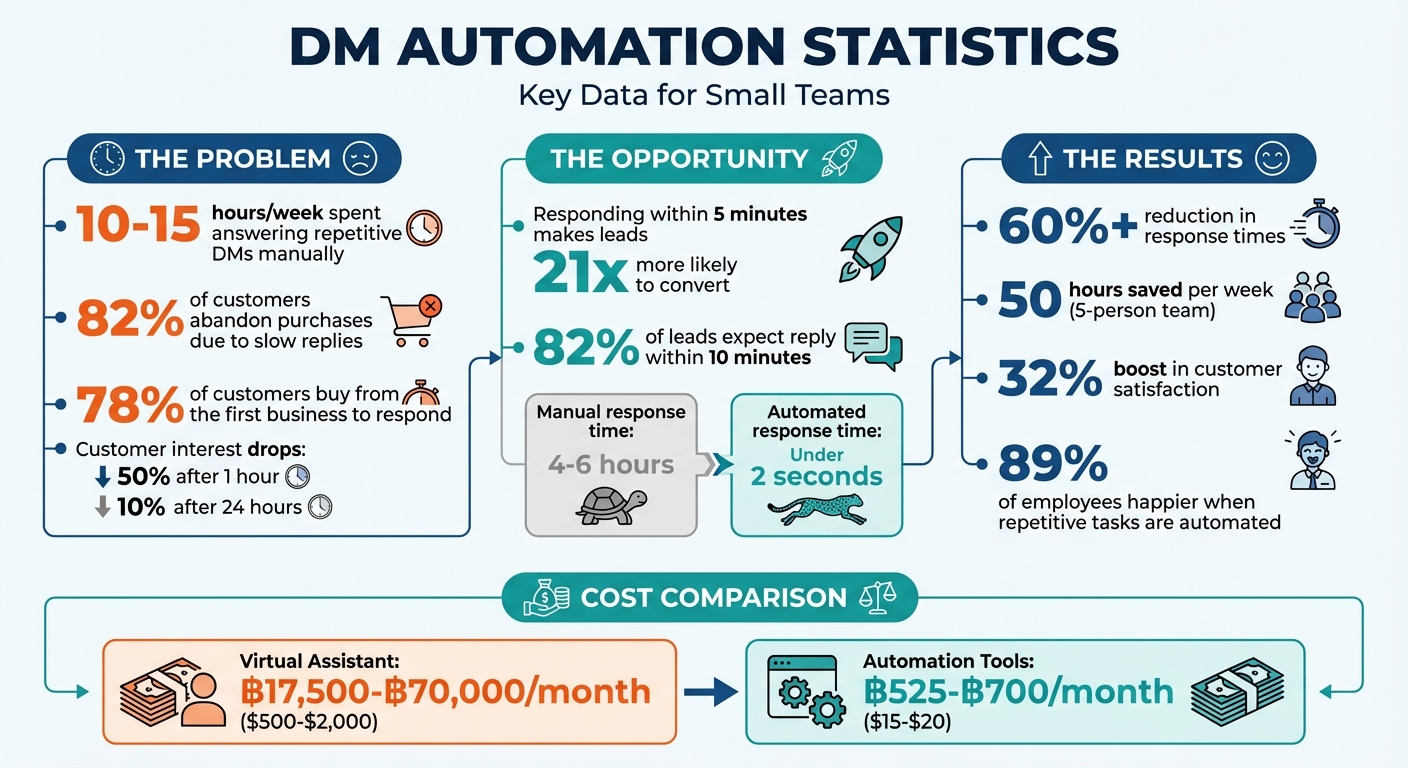
Struggling with too many LINE DMs? Small teams often spend 10–15 hours weekly answering repetitive questions, leading to slow responses, missed opportunities, and frustrated customers. Here’s the big takeaway: responding within 5 minutes makes leads 21x more likely to convert. But manual DM management just doesn’t scale.
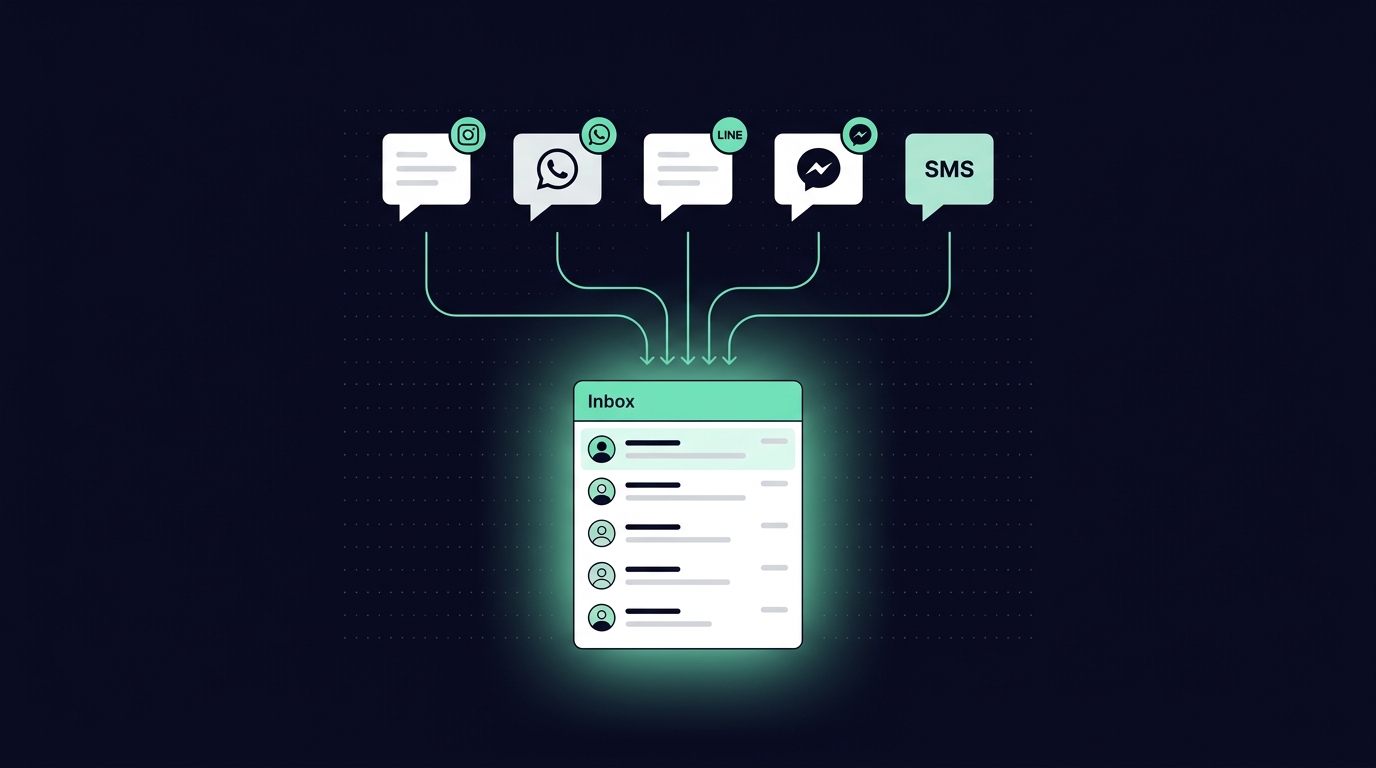
The solution? DM automation. Tools like ReplyAll Chat centralize all your LINE messages into one inbox, automate replies to FAQs, and route messages to the right team members. This helps you:
- Respond instantly to routine queries.
- Save up to 50 hours per week.
- Boost customer satisfaction while keeping costs low.
Want faster responses and fewer headaches? Automation lets you handle more messages without hiring extra staff.
Why Manual DM Management Doesn’t Scale for Small Teams
Once your daily DM count starts climbing past 50, managing them manually becomes a nightmare. It’s not just about keeping up with speed; the limitations of manual processes can overwhelm small teams, leading to delayed responses, workflow bottlenecks, and even burnout. Let’s dive into the core challenges: juggling multiple inboxes, slow response times, and the hurdles of scaling through hiring.
Multiple Inboxes Create Workflow Problems
Managing messages across platforms like LINE, Instagram, WhatsApp, and Messenger is more than just inconvenient - it’s a productivity killer. Each platform has its own interface and notification system, forcing constant app-switching that wastes time and focus. This back-and-forth not only increases the risk of missed or duplicated messages but also creates information silos that disrupt team efficiency. The result? Slower responses and a hit to customer trust.
Slow Responses Damage Customer Trust and Brand Reputation
Here’s a harsh truth: 82% of customers have abandoned a purchase because a business was too slow to reply. Speed matters, especially in Thailand’s relationship-driven market, where quick responses signal that customers are a priority. Delays don’t just frustrate - they erode trust and suggest poor post-sale service.
The numbers paint a clear picture:
- Customer interest drops to 50% after an hour and plummets to 10% after 24 hours.
- 78% of customers buy from the first business to respond.
Over time, slow replies train customers to stop reaching out altogether - a behavior psychologists call “learned helplessness”. While speed is vital, small teams often can’t rely on hiring alone to meet these expectations.
Hiring More Staff Isn’t Always Possible
Hiring more people sounds like a straightforward fix, but for small teams, it’s often out of reach. Salaries, benefits, and overhead costs quickly add up, stretching tight budgets. Even if hiring is an option, training staff to handle specialized messaging platforms takes time - something small teams don’t have.
To make matters worse, small businesses often lose 10–15 hours a week answering repetitive questions about basic topics like operating hours, pricing, and shipping. The reality is, once message volumes surpass 50 per day, manual management starts to fail, especially when customers expect responses at any hour - whether it’s 2 a.m. or 2 p.m.
“If you’re a one-person team or a small crew, you physically can’t be on your phone 24/7 watching for messages.”
– Rao, Founder, Smallforce
The gap between customer expectations and what small teams can deliver manually keeps growing. This is where automation steps in to revolutionize how DMs are managed.
How ReplyAll Chat Automates DM Management for Small Teams

ReplyAll Chat simplifies the way small teams handle direct messages (DMs) by centralizing and automating workflows for LINE. It addresses common pain points like juggling multiple inboxes and slow response times, turning what used to be a chaotic process into an efficient system. Instead of wasting time switching between apps or repeatedly typing out answers to frequently asked questions, teams can focus on conversations that genuinely need a personal touch. This approach directly reduces the fragmentation and delays that often come with DM management.
One Inbox for All Messaging Platforms
With ReplyAll Chat, all your DMs and public comments are gathered into a single, searchable dashboard. By syncing conversations in real time through LINE’s official API, it eliminates the hassle of jumping between apps. This unified system not only saves time but also provides a complete interaction history for each customer. That means your team can offer tailored responses without asking customers to repeat themselves. Plus, internal notes make it easy for team members to coordinate behind the scenes.
AI-Powered Reply Suggestions Speed Up Responses
ReplyAll Chat takes efficiency a step further with AI-driven reply suggestions. The platform uses AI to analyze incoming messages, identify their intent - whether it’s about pricing, bookings, or complaints - and draft responses using your business data. For more delicate matters like refunds or complaints, the AI prepares a draft that requires human approval before sending. This system ensures common queries are addressed instantly, which is crucial since responding within five minutes can make leads 21 times more likely to convert.
Automatic Message Routing Based on Team Availability
To keep things running smoothly, ReplyAll Chat automatically routes messages to the right team members based on factors like workload, expertise, urgency, and even sentiment. Team members can set their status to “available” or “away”, helping the system distribute tasks efficiently. When a conversation is passed to another agent, the new team member gets full access to the customer’s history, so there’s no need for the customer to repeat themselves. This ensures a seamless handoff and a better overall experience.
Analytics Dashboards Track Team Performance
ReplyAll Chat also includes a performance dashboard that tracks key metrics like response times, resolution rates, and conversation volumes across all messaging platforms. These insights help teams identify trends, evaluate which automation rules are working best, and pinpoint any bottlenecks in the workflow. By providing this level of visibility, teams can fine-tune their processes and quickly demonstrate the return on investment for automation.
Business Results from DM Automation
DM automation speeds up responses and increases team efficiency, leading to higher sales and happier customers - all without needing to hire more staff.
Cut Response Times by 60% or More
Automation slashes response times dramatically. On average, small businesses manually replying to DMs take about 4–6 hours, but automation tools can respond in under 2 seconds. Tools like ReplyAll Chat, powered by AI, play a big role in achieving these improvements. Why does speed matter so much? Because 78% of customers choose the first business to respond. Every hour of delay can reduce conversion rates by about 50%. Plus, while 82% of leads expect a reply within 10 minutes, many businesses take over five days to respond. Automation handles routine questions - like pricing, operating hours, or location - instantly, leaving your team free to focus on more complex, high-value interactions.
“Speed isn’t about typing faster. It’s about removing friction.” - Rohan Rajpal, Spur
Manage More Conversations Without Hiring
Small teams often spend 10–15 hours a week managing DMs manually. DM automation can cut this down to just 3 hours per week. For a five-person team, this means saving about 50 hours of work each week (assuming each team member saves two hours daily). This extra capacity enables your team to handle sudden spikes in message volume, capture leads even in the middle of the night, and maintain quality - all without hiring additional staff.
The cost savings are also hard to ignore. In Thailand, hiring a virtual assistant costs between ฿17,500 and ฿70,000 per month (US$500–US$2,000). Meanwhile, automation tools cost just ฿525–฿700 per month (US$15–US$20), offering 24/7 coverage without the hassle of training or worrying about employee turnover. Businesses that adopt automation report a 32% boost in customer satisfaction, and 89% of employees feel happier at work when repetitive tasks are automated. These benefits make DM automation a game-changer for businesses looking to optimize their workflow and results.
How to Set Up DM Automation for Your Team
You don’t need to be a tech whiz to set up DM automation - it’s simple and can be done in less than a week. By putting this system in place, your team can handle customer inquiries more efficiently and at scale. Here’s a straightforward guide: start by assessing your current performance, then configure automation rules, and finally, use analytics to fine-tune your setup.
Measure Current Performance and Set Clear Goals
Before diving into automation, it’s crucial to understand where you currently stand. Take a look at 50 of your most recent DMs to get a sense of your average response time and identify the top 10 most common questions. Track these metrics over 30–90 days to establish a realistic baseline.
Once you have that data, set specific goals that align with your priorities. For instance, you might aim to cut your median response time in half or ensure 90% SLA adherence for high-priority leads within 30–60 days. These clear targets will guide the next steps as you configure your automation tools.
Configure Automation Rules and Smart Replies
With your LINE Official Account connected to ReplyAll Chat, start configuring triggers and smart replies. For example, you can create triggers for specific actions like keyword messages (e.g., “price” or “hours”), comments on posts or Reels, Story mentions, or when someone follows your account.
Feed your Knowledge Base with key details - pricing, business hours, shipping policies, and FAQs - to ensure accurate responses. To keep replies sounding natural, create 3–4 variations for each template. Adding a short delay of 5–10 seconds to automated responses can also help avoid the impression of being overly robotic. And for sensitive issues, like complaints or custom quotes, set up options like “Draft” or “Talk to Human” to ensure a personal touch when needed.
Once everything is up and running, analytics will be your best friend for making improvements.
Use Analytics to Improve Over Time
Set aside 20 minutes every Monday to review your performance dashboard and identify 2–3 actionable insights. Focus on metrics such as Total Outreach, Reply Rate, and Close Rate to see how well your automation is working.
For even better results, try A/B testing different message scripts with small groups of 10–20 leads. This will help you figure out which versions resonate most before rolling them out broadly. Tools like ReplyAll Chat make this process easier by pinpointing which automation rules are hitting the mark and which need tweaking. Teams that consistently review their data and refresh their copy tend to maintain strong engagement rates while steering clear of spam filters.
Conclusion
Small teams no longer have to choose between responding quickly and managing workloads effectively. With DM automation, routine interactions - often taking up 10–15 hours a week - are handled seamlessly, allowing your team to focus on meaningful conversations that require a personal touch. Data shows that fast replies significantly increase conversion rates. For instance, a team managing 300 inquiries each month could save around 25 hours by automating routine tasks, cutting about 5 minutes per inquiry. That’s nearly an entire workweek saved.
This efficiency is made possible by a tool that consolidates your messaging platforms. ReplyAll Chat provides a unified dashboard for LINE, along with AI-driven reply suggestions, automated message routing, and detailed performance analytics. The Starter plan is available for approximately ฿16,500 per month, covering up to 2,000 active contacts, unlimited messages, and unlimited team members.
FAQs
What should we automate first in our DMs?
Automating routine and repetitive tasks is a smart first step. For example, setting up automated responses for FAQs - like business hours, pricing, or product details - ensures customers get quick answers while freeing up time for your team.
Another great tool? Comment-to-DM automation. This feature allows you to turn public comments into private conversations, making it easier to address customer needs directly and discreetly.
By focusing on these high-impact areas, you can handle more interactions efficiently without losing that personal connection customers value.
How do we keep automated replies sounding human?
To make automated replies feel more human, focus on personalization and a conversational tone. Use friendly language and include details like the customer’s name or specific references to their inquiry. This adds a layer of authenticity that resonates with people. Tools such as ReplyAll Chat can assist by generating replies that sound natural and thoughtful. The key is finding the right balance between automation and a personal touch, ensuring responses remain genuine and engaging.
How can we measure ROI from DM automation?
Measuring ROI from DM automation involves keeping an eye on specific metrics that reveal its effectiveness. Start by tracking revenue per chat, which shows how much income each conversation generates. Another key metric is first response time, as quicker replies often lead to better customer satisfaction and engagement. Don’t forget conversion rates, which highlight how well your automated system turns interactions into sales or desired actions.
To connect the dots between conversations and actual sales, use attribution models. These help you understand how automation contributes to your overall revenue. Lastly, focus on metrics that align directly with your business goals. This ensures you’re getting insights that matter most for evaluating your team’s performance and the automation’s impact.