Manage 500+ Daily DMs Without Hiring
How to Handle 500+ Daily DMs Without Hiring More Staff
Managing over 500 daily LINE DMs is possible without adding staff. Here’s how:
- Centralize Messages: Use tools like ReplyAll Chat to combine all DMs into one inbox. This eliminates the need to switch apps and reduces time spent managing conversations.
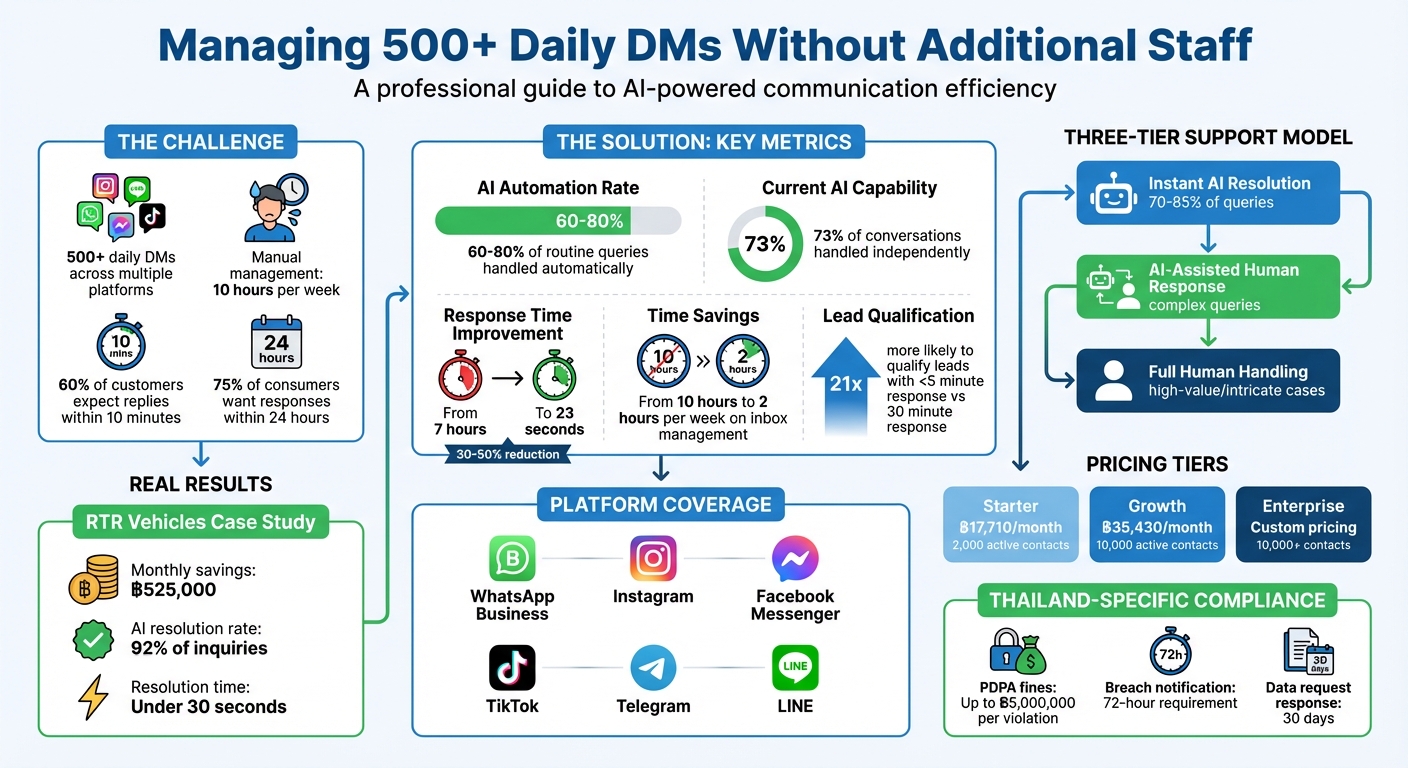
- Automate Responses: AI can handle 60–80% of routine queries (e.g., pricing, shipping) within seconds, freeing your team to address complex issues.
- Smart Routing: Automatically assign messages based on query type, language, or urgency to the right team or agent.
- AI-Powered Replies: Use smart reply suggestions to speed up response times while maintaining a consistent tone.
- Track Performance: Monitor response times, resolution rates, and AI handling rates to identify and fix bottlenecks.
- Personalize for Thai Customers: Maintain polite tones, use the DD/MM/YYYY date format, and comply with PDPA regulations to meet local expectations.
Key Insight: Businesses like RTR Vehicles saved ฿525,000 monthly by using AI to resolve 92% of inquiries in under 30 seconds. With tools like ReplyAll Chat, you can streamline DM management, improve response times, and boost customer satisfaction - all without increasing your team size.
Centralizing Messages with ReplyAll Chat

When you’re dealing with 500+ LINE DMs daily, constantly checking notifications and managing conversations can quickly lead to tab fatigue, making it easy to lose track of messages. This scattered approach can result in overlooked messages and missed sales.
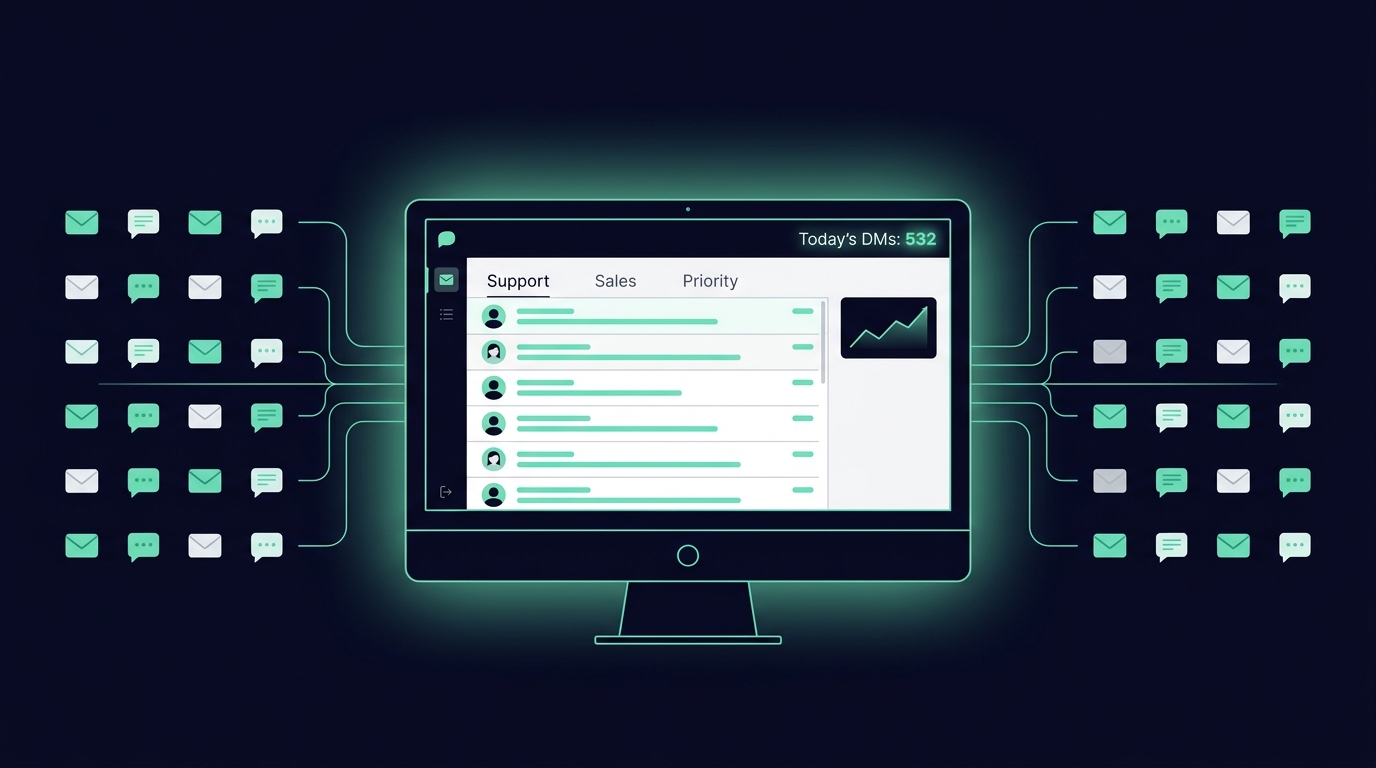
ReplyAll Chat solves this problem by integrating with LINE’s official API to bring all your messages into one centralized dashboard. Every DM, comment, and story mention is displayed in a single, searchable space, complete with conversation histories and contact details. This eliminates the need to switch between apps to figure out if a customer has already asked about pricing on another platform.
The time savings are huge. Many businesses report cutting their manual inbox management from 10 hours to just 2 hours per week after centralizing their messaging. Teams can assign conversations to specific agents, add internal notes for context, and avoid duplicate responses to the same customer. Plus, with mobile apps for Android and iOS offering real-time notifications, your team can stay on top of all channels, even on the go. Let’s dive deeper into how ReplyAll Chat simplifies multi-platform messaging.
Managing Multiple Platforms in One Place
ReplyAll Chat integrates with LINE Official Account using LINE’s official Messaging API. It organizes all incoming messages into a unified inbox, clearly tagging each one so your team can instantly understand the context. This streamlined setup allows you to adjust account settings quickly for smooth operation.
Setting Up Your Account
To get started, connect your LINE Official Account to the ReplyAll Chat dashboard. Set up shared team inboxes (like support@company.com or sales@company.com) to ensure all interactions are visible to the right team members. You can configure assignment rules so incoming messages are automatically routed to the appropriate team or individual, avoiding duplicate responses or missed queries. Use labels like “Urgent”, “Lead”, or “Needs Info” to prioritize and track conversations through your pipeline. The entire setup process takes less than an hour, so you can start managing everything from one workspace right away. This streamlined approach boosts team efficiency and ensures no customer message slips through the cracks.
Automating Message Distribution and Prioritization
Once all your messages are consolidated, the next hurdle is making sure they’re sent to the right person without delay. Relying on manual assignment can create bottlenecks - especially when a team member has to manage and distribute over 500 daily direct messages. That’s where automation steps in.
ReplyAll Chat simplifies this process with two automated assignment methods:
- Round Robin: Distributes contacts equally among team members, ensuring everyone gets a fair share of the workload.
- Least Open Contacts: Assigns messages to the agent currently managing the fewest active conversations, helping them focus on providing better support.
You can also activate Online-Only Assignment, which ensures that messages are routed only to team members who are currently online and available.
Routing Messages by Query Type
After automating distribution, you can fine-tune message routing to ensure each query lands with the right specialist. For example, a pricing question should go to sales, while a refund request belongs with customer support. ReplyAll Chat uses intent-based routing, analyzing free-text messages for keywords like “pricing”, “support”, or “billing” to direct conversations to the appropriate team.
You can also implement multi-condition routing. This allows you to factor in elements like language, query type, or business hours. For instance, Thai-language messages can be directed to your Bangkok team, while English refund requests can go straight to your customer service manager. To handle unexpected queries, always set up a fallback team for unmatched messages.
Prioritizing High-Value Customers
When it comes to high-value customers, speed is everything. Over 70% of consumers expect responses within 24 hours, while high-intent leads may require a reply in as little as 15–30 minutes. ReplyAll Chat helps identify VIPs by leveraging CRM data or follower counts, ensuring they’re routed to senior agents or placed in priority queues.
You can also automate tagging to label messages with categories like “Hot Lead”, “VIP”, or “Support High” based on keywords or customer information. To maintain continuity, returning customers can be automatically reassigned to the same agent they previously interacted with. If agents are overwhelmed, the system can send “Overcapacity” notifications to manage customer expectations effectively.
Using AI-Powered Smart Reply Suggestions
AI-powered smart replies take automated messaging to the next level, making responses faster and more personalized. Manually typing out replies for hundreds of messages every day isn’t practical. That’s where ReplyAll Chat’s Smart Reply feature comes in. This tool automatically drafts responses, cutting response times significantly. In fact, AI-driven replies can reduce response times by 30–50%, bringing the average first reply time down from 7 hours to just 23 seconds.
Here’s how it works: the AI analyzes a customer’s message, taps into your knowledge base, and suggests a reply that aligns with your brand’s tone. For example, if someone asks about delivery times to Bangkok, the AI pulls the relevant shipping details and crafts a response that feels like it came directly from your team. It’s perfect for handling routine questions about things like pricing, business hours, or product availability, freeing up your team to tackle more complex issues.
Customizing AI Responses for Your Brand
To ensure the AI reflects your brand’s personality, you can train it to deliver authentic, on-brand replies. ReplyAll Chat allows you to create an AI Assist Persona by defining specific traits, behaviors, and communication styles. For instance, a luxury skincare brand might opt for a persona that’s “elegant and sophisticated,” while a sporting goods store might prefer something “energetic and motivational”.
“Your brand voice determines how your business writes, speaks and engages with audiences. Before using AI Assist to draft replies… define the AI Assist Persona… so that replies drafted by AI Assist are consistent with your brand voice.” - respond.io
You can also upload business materials - like product catalogs, FAQs, pricing sheets, and return policies - as Knowledge Sources to help the AI provide accurate responses. If your customer base includes Thai speakers, uploading documents in Thai ensures the AI can handle local queries effectively. You can even tweak settings to control the tone, such as whether replies include contractions, emojis, or technical language. Before going live, the Test AI Assist feature lets you preview how the AI responds to sample questions.
The AI doesn’t stop learning. When your team steps in to handle a tricky query, the system adapts based on that interaction. Over time, this continuous learning improves the quality and accuracy of its suggestions. By setting up personalized AI responses, you ensure every reply fits seamlessly into the conversation, backed by full context from past interactions.
Accessing Full Conversation Histories
Context matters, especially for follow-ups. ReplyAll Chat stores every interaction - both automated and manual - permanently. This means that when a customer returns with another question, your team can view the entire conversation thread, including what the AI said, what the customer asked, and how previous issues were resolved. This eliminates the need for customers to repeat themselves, making follow-ups faster and more satisfying.
These conversation histories are also a goldmine for refining your AI. By reviewing past interactions, you can spot areas where the AI struggled or where customers needed human help. Updating your Knowledge Sources regularly - say, every month - ensures the AI stays up-to-date with new products, promotions, or policy changes. This ongoing refinement keeps your AI relevant and effective as your business grows and evolves.
Tracking Performance with Analytics
Once automated message distribution is in play, the next step is tracking how well it works. Metrics are your guide - they show you what’s working and what needs tweaking. ReplyAll Chat’s analytics dashboard gives you a detailed look at how your team manages DMs, pinpoints bottlenecks, and highlights workflows that need adjustments. No more relying on guesswork.
Monitoring Response Time and Resolution Rates
Key metrics like Average Response Time (ART), Average Resolution Time, and Time to First Assignment are front and center in the dashboard. These numbers confirm whether automated routing is doing its job. Why does speed matter? Because 60% of customers expect a reply within 10 minutes, and companies that respond within 5 minutes are 21 times more likely to qualify leads than those that take 30 minutes.
Another crucial metric, Average Number of Assignments to Close, shows how often messages are reassigned before resolution. If this number is high, it’s a red flag that routing isn’t hitting the mark, leading to delays for customers. This data doesn’t just measure performance - it points directly to areas where your workflows can be sharpened.
Improving Workflows with Data Insights
The Top 10 Topics report and Conversation Opened Heatmap are goldmines for understanding customer behavior. They reveal the most common queries and when your team faces the heaviest traffic. This allows you to fine-tune automation. For example, if 42% of your DMs come in after hours (17:00–09:00), you might choose to shift current staff to cover these times instead of hiring extra help.
The dashboard also tracks your AI Handling Rate versus Handoff Rate, showing how much your AI is managing on its own. Today’s AI can independently handle about 73% of conversations. If certain topics see frequent handoffs, it’s a signal to update your knowledge base or refine AI training by reviewing poorly rated responses or low CSAT scores.
Additionally, the dashboard flags conversations with unusually high message counts or lengthy resolution times. These insights can spotlight areas where agents may need more training. By using this data to improve automations and adjust resource allocation, you can scale your operations without adding extra team members.
Scaling with Automated Reviews and Plan Options
Automating Customer Feedback Collection
Getting customers to leave reviews can be a challenge. ReplyAll Chat bridges the gap between the 68% of consumers willing to leave a review and the 5–10% who actually do so without being asked. By automating review requests immediately after resolving a customer interaction, your team can collect valuable insights without any extra effort.
Here’s how it works: The system uses a smart, two-step filtering process. Customers who rate their experience 4–5 stars are directed to public platforms like Google, boosting your online reputation. Meanwhile, lower ratings are redirected to private forms, allowing you to address issues directly and protect your brand.
With this automated approach, feedback collection becomes effortless. Plus, ReplyAll Chat’s flexible plans make managing direct messages (DMs) even smoother.
Selecting the Right Plan for Your Business
Every business needs solutions that can grow with them, and ReplyAll Chat’s tiered plans are designed to do just that. Here’s a quick breakdown:
- Starter plan: At ฿17,710 per month, this plan supports unlimited messages, connections, and team members for up to 2,000 active contacts each month.
- Growth plan: For ฿35,430 per month, you can manage up to 10,000 active contacts and access custom dashboards along with additional features.
- Enterprise plan: Tailored to businesses with over 10,000 active contacts, this plan offers custom pricing, dedicated integrations, SLA guarantees, onboarding support, and volume discounts.
Whether you’re just starting out or scaling up, there’s a plan that fits your needs.
Best Practices for Thailand-Based Businesses
Optimizing automation to align with Thailand’s cultural and legal landscape is key to maintaining strong customer engagement, especially when managing over 500 DMs daily.
Adapting Messages for Thai Customers
Managing such a high volume of DMs in Thailand goes beyond simple translation - it requires cultural sensitivity. Thai society places a high value on respect, politeness, and maintaining social harmony. Automated messages should reflect these values, as a tone that might feel neutral in other markets could seem abrupt or impolite to Thai customers.
For instance, always use the DD/MM/YYYY date format and metric units like kilometres, kilograms, and Celsius in your replies. A message such as, “Your order will arrive by 15/04/2026”, ensures clarity and familiarity for local audiences.
Tone matters too. For younger Instagram users, a casual and friendly tone works best. On the other hand, corporate clients on LINE expect a more formal approach. Tools like ReplyAll Chat allow you to create tailored response templates for different customer groups, helping your brand maintain the right tone across all platforms.
“Thai consumers are savvy, socially aware, and deeply connected to their cultural identity. They expect brands to speak their language, not just linguistically, but emotionally and culturally.”
Avoiding transliteration errors is another critical step. A notable example is IKEA Thailand, which had to rename products in 2024 after Swedish terms were misinterpreted in Thai. To prevent such issues, involve native Thai speakers in reviewing product names and marketing scripts before launching campaigns.
Conclusion
Handling over 500 daily DMs without expanding your team is entirely possible with the right tools and strategy. By consolidating LINE messages into ReplyAll Chat’s unified inbox, your team avoids the inefficiencies of switching between apps. Plus, AI-powered automation can manage 70–85% of routine inquiries - like questions about pricing, shipping, and availability - allowing your team to focus on more complex, high-value interactions that genuinely need human expertise. The three-tiered support model - instant AI resolutions, AI-assisted human responses, and full human handling for intricate cases - ensures every customer gets the attention they deserve while helping your business grow.
For businesses in Thailand, customizing your system to align with local norms is essential. This includes adjusting your tone to reflect Thai cultural values, using the DD/MM/YYYY date format, and adhering strictly to PDPA regulations. ReplyAll Chat’s permanent conversation history and centralized data management make compliance audits easier while safeguarding customer privacy.
Companies managing 500+ DMs a day are now delegating only the most complex messages to human agents. With instant response times, businesses can meet the expectations of 75% of consumers who want replies within 24 hours, boosting both customer satisfaction and conversion rates.
FAQs
How do I connect my LINE Official Account to ReplyAll Chat?
To start using ReplyAll Chat, first sign up and complete the platform’s onboarding process. Then, connect your LINE Official Account by authenticating it and granting the necessary permissions. Once linked, ReplyAll Chat takes over by automating responses, organising message priorities, and delivering tailored interactions. For step-by-step instructions, check out the platform’s setup documentation or follow the onboarding guide.
What should AI handle vs what needs a human reply?
AI can handle routine and repetitive queries like shipping details, pricing, product recommendations, and returns. By taking care of these tasks, businesses can improve efficiency and allow staff to focus on more important responsibilities.
On the other hand, humans excel in managing complex or sensitive issues that require empathy and judgment, such as complaints, refund disputes, or tailored assistance. Striking this balance ensures quicker responses while preserving trust and high-quality customer interactions.