LINE DM Management for Businesses 2026
How to Manage LINE DMs for Business in 2026
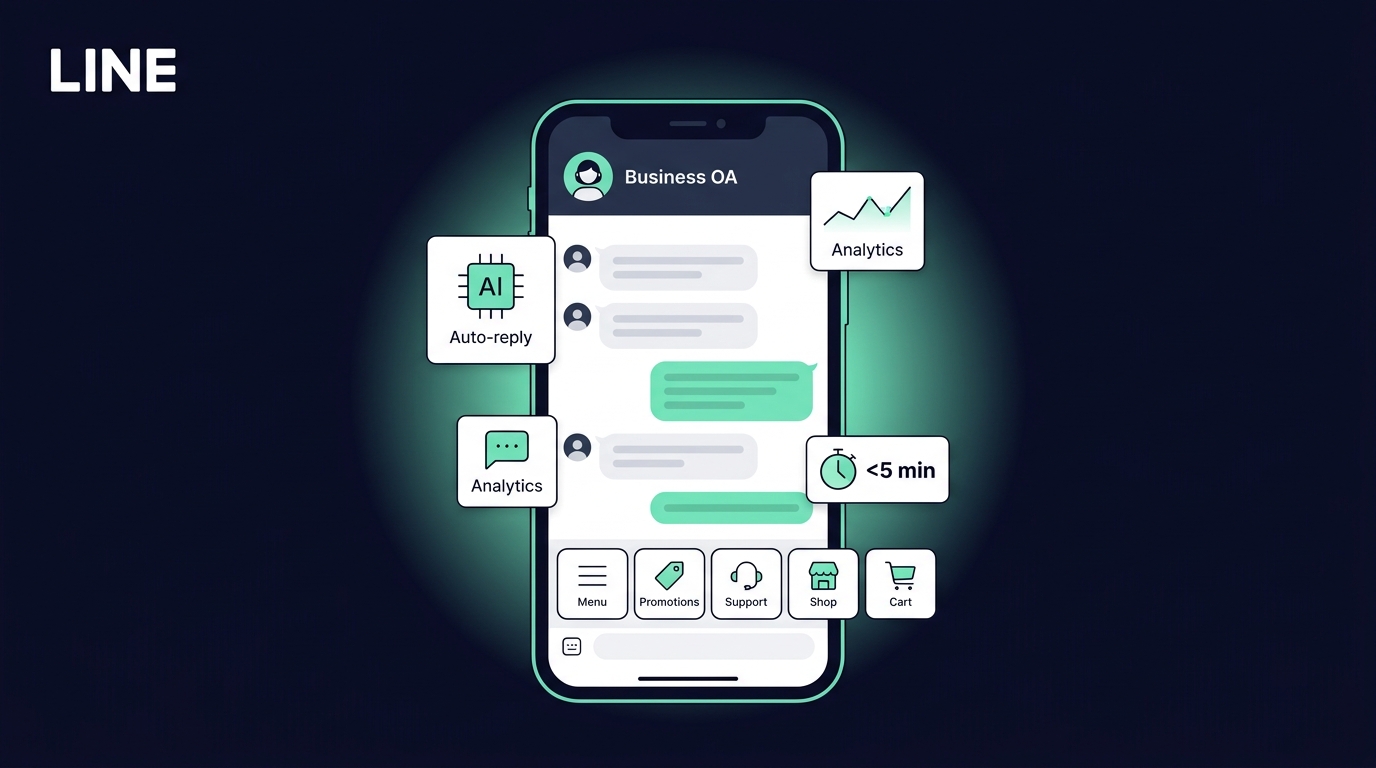
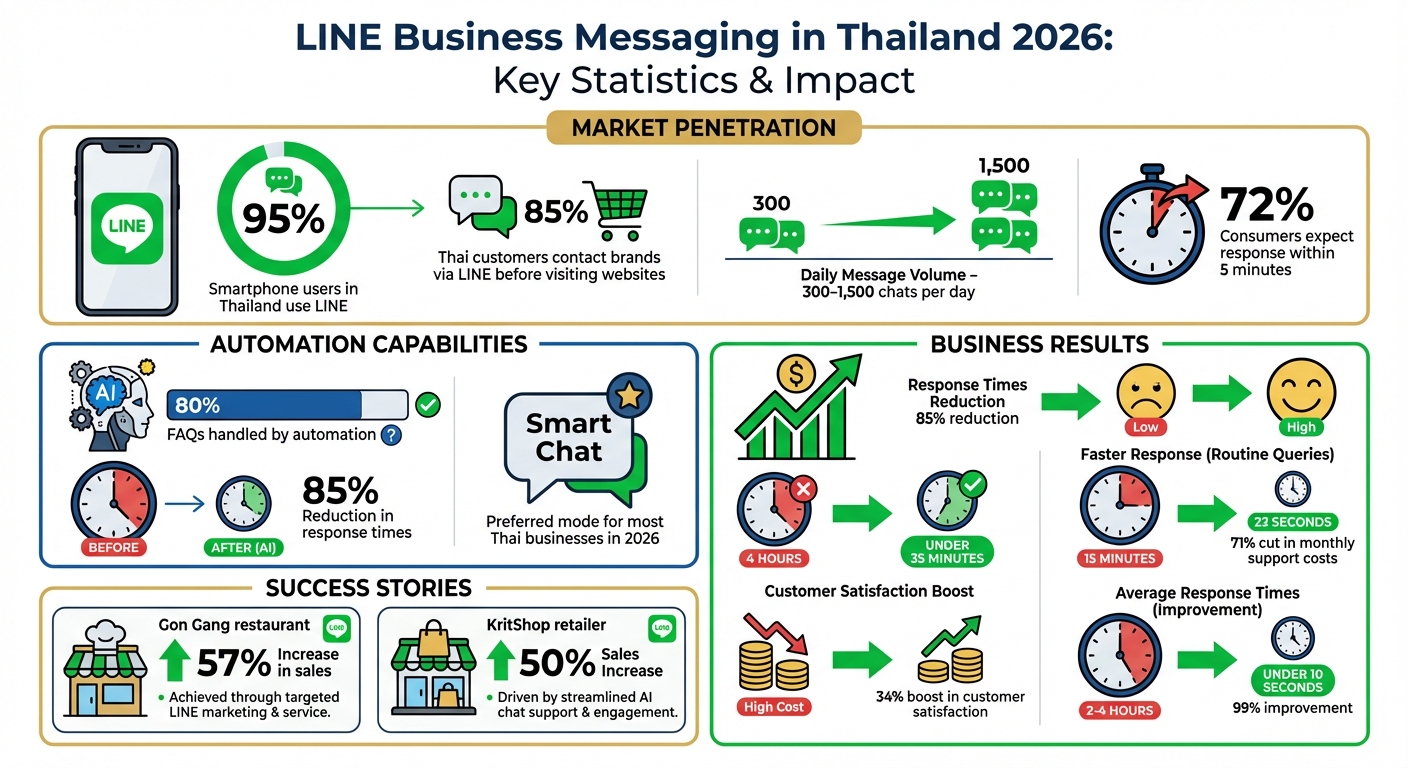
LINE is the primary communication platform in Thailand, with 95% of smartphone users relying on it. For businesses, it’s a critical tool, as 85% of Thai customers contact brands through LINE before visiting their websites. However, managing the heavy volume of daily messages - often 300 to 1,500 chats per day - is a challenge, especially when 72% of consumers expect a response within 5 minutes.
To effectively manage LINE DMs in 2026:
- Automate responses: Use LINE’s Smart Chat or tools like ReplyAll Chat to handle up to 80% of FAQs.
- Centralize communication: Integrate LINE with dashboards like ReplyAll Chat to manage messages, emails, and calls in one place.
- Leverage AI: Tools like GPT-4 can suggest replies and reduce response times by 85%, ensuring faster, consistent interactions.
- Organize customer data: Use tags, notes, and CRM integrations to categorize customers (e.g., VIPs) and personalize responses.
- Track performance: Monitor metrics like response times and customer satisfaction to improve service quality.
Setting Up LINE for Business DMs
How to Configure Your LINE Official Account
To get started, choose the right response mode for your business - Manual, AI, or the hybrid Smart Chat. By 2026, most Thai businesses lean towards Smart Chat since it can automatically handle about 80% of FAQs while still allowing human agents to step in for more complex or sensitive issues.
Your greeting message is crucial because it’s the first thing customers see when they connect with your account. You can use up to five message “balloons” that are triggered automatically. These can include text, stickers, coupons, or rich messages. For a personal touch, use the Display Name feature to insert the customer’s LINE name into your greeting. Thai customers often value this friendly and personalized approach.
If your business deals with a high volume of messages, integrating the LINE Messaging API with a third-party dashboard is a game-changer. This allows for advanced features such as team routing, CRM integration, and multi-agent support. To ensure no inquiry is missed, enable New Message notifications in your app settings, especially if you manage messages through the web manager on a PC.
Organize your customer base with Tags (e.g., “VIP” or “Interested in Promo”) and use Notes to keep track of important details like birthdays or product preferences directly in the chat interface. If you need more advanced options, consider upgrading your OA Chat subscription for better tagging and segmentation tools. Additionally, set up keyword responses for common Thai terms, such as “ราคา” (price), to provide quick and efficient answers.
Adapting Your LINE Account for Thai Customers
Once your account is configured, it’s time to fine-tune it for Thai audiences. In Thailand, communication is generally warm and polite. Incorporate polite particles like “Kha” (for female speakers) or “Krap” (for male speakers) into your automated responses to align with local etiquette. If time is tight, AI tools can help expand short notes into polished Thai sentences that sound professional and respectful.
A Rich Menu is another essential feature. This persistent menu sits at the bottom of your chat interface, allowing customers to easily access FAQs, promotions, or your website with just a tap - no need to send a message.
Click Broker, an insurance company, successfully used auto-tagging in 2025 to segment Thai customers based on their interactions with the Rich Menu and keyword usage. This enabled them to send tailored insurance promotions without repeatedly requesting customer information.
Lastly, set clear business hours and use Away Messages to manage customer expectations when your team is offline. This simple step can reduce frustration and improve overall satisfaction.
Using ReplyAll Chat for LINE DM Management
Managing All DMs from One Dashboard
ReplyAll Chat brings all your LINE conversations, calls, and emails into one easy-to-use dashboard. This setup lets you handle every LINE interaction in one place, reducing delays and ensuring no messages slip through the cracks.
The platform allows you to add as many team members as needed without worrying about additional costs. Each agent gets access to the full conversation history, can assign chats to colleagues, and leave internal notes for context. For instance, if a customer asks about a delayed shipment, one agent can note the tracking number, so the next team member doesn’t have to ask the customer for the same details again.
To make things even smoother, chat tagging helps organize conversations by topic, urgency, or customer type. You can label messages as “Urgent”, “VIP Customer”, or “Product Inquiry” to help your team prioritize efficiently. Automated routing ensures important leads are directed to your most experienced agents right away.
This centralized system also sets the stage for integrating advanced AI tools to streamline responses even further.
AI-Powered Reply Suggestions for Faster Responses
ReplyAll Chat uses GPT-4 to suggest replies tailored to your business, drawing from your knowledge base and past tickets. When a customer sends a message, the AI drafts a response for your agent to review and send within seconds. Plus, real-time sentiment analysis pinpoints frustrated or upset customers, ensuring urgent issues are escalated to senior agents immediately.
This AI-driven approach doesn’t just speed up response times - it also ensures consistency. By training the system with your product guides, return policies, and shipping FAQs, customers receive accurate, on-brand replies every time.
Businesses using AI-powered messaging on LINE have reported impressive results: average response times dropping by 85% (from 4 hours to under 35 minutes), a 34% boost in customer satisfaction, and a 71% cut in monthly support costs.
Custom Integrations for Large Businesses
For larger companies managing significant message volumes, ReplyAll Chat offers tailored integrations. It works seamlessly with CRMs like Salesforce, HubSpot, and Zendesk. Using HTTP Request Steps in the workflow builder, you can qualify leads or create support tickets directly within LINE chats. For example, when a customer inquires about a product, the system can check their purchase history and suggest upsells automatically.
The Enterprise plan takes things further, offering SLA guarantees and onboarding support to handle 10,000+ monthly active contacts. You’ll also get access to custom dashboards to monitor team performance and optimize workflows. Additionally, webhooks enable real-time data sharing between LINE DMs and your internal systems, making automated tasks like order confirmations or shipping updates a breeze.
| Plan | Monthly Price | Active Contacts | Key Features |
|---|---|---|---|
| Starter | ฿14,970 | Up to 2,000 | Unlimited messages, team members, contact management, performance analytics dashboard, and priority support |
| Growth | ฿29,970 | 2,000–10,000 | Everything in Starter plus custom dashboards and feature requests management |
| Enterprise | Custom | 10,000+ | All Growth features, custom integrations, SLA guarantees, onboarding assistance, and volume discounts |
Automating LINE DM Workflows
Blending AI-powered automation with well-structured team workflows allows your LINE DM management to grow effortlessly alongside increasing customer needs.
Setting Up Automated Responses with AI
ReplyAll Chat leverages AI to tackle common customer questions without requiring manual effort. By connecting to your LINE Official Account via the Messaging API, the system uses your uploaded FAQs, product manuals, and policies to provide accurate answers. For instance, if a customer asks about delivery times or return policies, the AI pulls precise responses directly from your provided documentation.
The platform uses Retrieval-Augmented Generation (RAG) to ensure responses are strictly based on your business materials, avoiding the risks of fabricated answers. Additionally, you can set up keyword-triggered auto-replies for simple queries like “hours” or “menu”, preserving AI resources for more intricate customer needs.
Once your automated responses are in place, the next step is to streamline how conversations are directed to your team.
Building Team Workflows for DM Distribution
While automation handles routine queries, effective workflows ensure that complex inquiries reach the right team member. ReplyAll Chat uses routing rules based on factors like business hours, agent expertise, and availability. During working hours, messages are sent to active agents, while after-hours queries are either handled with automated replies or queued for the next day.
To further enhance efficiency, the system allows you to collect essential customer details through pre-chat surveys. When a customer starts a chat, the bot can request information like their name, email, or inquiry type, giving agents a head start with complete context.
For seamless internal collaboration, the platform includes features like tags and notes. Agents can categorize conversations with labels such as “Urgent”, “Technical Support”, or “VIP Customer” and add private notes about order histories or past interactions. These tools ensure smooth transitions between shifts, so customers experience uninterrupted service no matter who takes over.
Measuring and Improving LINE DM Performance
Tracking the right metrics can turn managing LINE DMs into a data-driven process. With ReplyAll Chat, you get access to a dashboard system that monitors everything from response times to team productivity in real time.
Using ReplyAll Chat Analytics to Track Performance
ReplyAll Chat’s dashboard offers five tabs: Overview, Performance, Channels, Users, and Instant Messages. Each tab provides specific insights into how your LINE communications are performing. For instance, the Performance tab highlights essential metrics like Average First Response Time and Average Resolution Time, which are crucial when customers expect almost instant replies. It also includes SLA tracking, categorizing tickets as either “Within SLA” or “Overdue SLA”, making it easier to identify and address bottlenecks.
One key metric to watch is the “One & Done” rate, which measures how many tickets are resolved with a single reply. A high rate here suggests that your initial responses - whether automated or human - are resolving issues effectively. The Users tab digs deeper into individual agent performance, tracking metrics like message counts and the ratio of assigned to resolved chats. This helps pinpoint team members who may need extra training or support.
For businesses utilizing AI automation, the dashboard provides a comparison between AI and human agent performance. On average, AI reduces response times by 97% for routine queries, cutting the time from 15 minutes to just 23 seconds. Additionally, the system identifies peak messaging hours by day and week, making it easier to adjust staffing levels during busy periods.
These insights help you identify weak spots and fine-tune your approach to improve customer satisfaction.
Using Data to Improve Your Communication Strategy
Use the performance data to sharpen your communication strategy. Start by auditing the last 90 days of LINE DMs to identify the top 20 recurring inquiries. These should be your main focus for AI automation. If the data shows high abandonment rates in specific chatbot flows, it’s a sign that customers are encountering friction at certain points.
“Speed isn’t just about satisfaction anymore. It’s a revenue multiplier.” - Reply.cx
Set SLAs tailored to LINE’s fast-paced nature. While email users might accept a 4-hour response time, LINE users expect replies in under 1 minute. Use dashboard alerts to track SLA breaches and keep your response times on target. Also, monitor your message open rates (aim for over 65%) and click-through rates (aim for over 12%) to ensure your content resonates with Thai customers. If engagement drops, experiment with different message formats or adjust your tone to better align with local expectations.
Don’t forget to track AI upvotes and downvotes, alongside CSAT scores, to gauge whether your automated responses feel helpful or impersonal. Regularly cleaning up your contact list by removing inactive LINE friends ensures your analytics reflect real customer behavior, not outdated or inactive accounts.
Best Practices for LINE DMs in Thailand
Keeping Brand Messaging Consistent Across Your Team
Thai customers expect seamless, professional, and reliable interactions, no matter which team member handles their query. Naturally, human agents have different tones and styles, which can lead to inconsistencies. This is where ReplyAll Chat steps in, centralizing all LINE conversations into one dashboard. With this tool, every team member has access to the same conversation history and customer details, ensuring a smooth and cohesive experience.
To maintain a consistent tone, use standardized templates and Chat Tags. These tools help track customer details while keeping communication aligned with your brand’s voice. Additionally, ReplyAll Chat offers AI-powered reply suggestions to unify messaging even further. For luxury brands, this is especially important - your LINE DMs should reflect the same warm and attentive service customers expect in physical stores.
These strategies also tie into streamlined workflows, making every customer interaction not just efficient but also aligned with your brand identity. Grouping customers into categories like “VIP”, “New Lead”, or “Waiting for Payment” ensures no one has to repeat themselves, avoiding potential frustration.
Meeting Thai Customer Expectations in 2026
Consistency is key, but speed is just as important. Thai customers expect rapid responses, and meeting these expectations can directly impact your revenue. Quick replies - within minutes - can significantly boost conversion rates. By using ReplyAll Chat’s AI automation, routine FAQs can be handled instantly, freeing up your team to focus on more complex, personalized inquiries.
Interactive visuals are another must-have for Thai audiences. Features like Rich Menus and Flex Messages create user-friendly interfaces within your LINE chats. To make your business even more engaging, consider custom branded stickers - these can help your brand feel approachable and become part of customers’ everyday conversations.
Gon Gang, a Japanese BBQ restaurant chain, showcased this perfectly in 2025. They implemented a full-funnel LINE workflow, where customers could view menus via QR codes, place orders, and make payments - all within LINE. This approach led to a 57% increase in sales and significantly reduced wait times.
Personalization is no longer a bonus - it’s expected. Use tools like purchase history and browsing behavior to recommend products directly within your DMs, tailoring the experience to each customer.
For example, KritShop, a salmon retailer, leveraged LINE’s CRM tools and introduced a point-based incentive program in 2025. The result? Their customer base tripled, and sales increased by 50%.
Striking the right balance between automation and human connection is critical. Make customers feel valued and recognized, but avoid being overly intrusive. A thoughtful approach will make all the difference in building lasting relationships.
Conclusion
Managing LINE DMs effectively in 2026 means finding ways to scale customer interactions without increasing your team’s workload. With LINE being used by 95% of smartphone users in Thailand, businesses simply can’t afford to let customer messages go unanswered or delay responses to basic questions.
This is where ReplyAll Chat comes in. It brings all your LINE conversations into one streamlined dashboard, alongside other popular platforms like WhatsApp and Instagram. With AI handling up to 80% of routine queries, and smart routing ensuring complex issues reach the right agent with full context, your business can operate 24/7 to meet the expectations of Thai consumers who increasingly demand instant replies.
The results speak for themselves: companies using AI-powered LINE management have reported a 71% drop in monthly support costs and an 85% reduction in time spent on repetitive tasks. Automation also slashes average response times from 2–4 hours to under 10 seconds - a 99% improvement. All of this is achieved while maintaining consistent, on-brand communication that resonates with Thai customers. These efficiencies free up your team to focus on strategic initiatives and meaningful customer engagement.
Whether you’re a small business starting with the Starter plan at ฿14,970/month or a larger enterprise needing tailored solutions, the key is to begin automating today. Start by building your knowledge base, identifying the 20 most common customer questions, and allowing AI to handle the repetitive work. This lets your team focus on fostering authentic customer relationships. In Thailand’s competitive market, businesses that succeed are those that combine speed, consistency, and personalization - turning automation into a powerful edge.
FAQs
What’s the best mix of AI and human replies on LINE?
In 2026, the perfect balance for customer support on LINE will blend AI-powered automation with human expertise. AI will handle routine tasks like answering FAQs and providing order updates, delivering instant and accurate responses around the clock. Meanwhile, human agents will step in for more complex or sensitive issues, offering empathy and specialized knowledge. This combination ensures efficiency while maintaining a personal touch, addressing the growing demand for both speed and personalized service.
How do I connect LINE DMs to my CRM securely?
To link LINE DMs to your CRM safely, utilize the LINE Messaging API through a reliable integration platform. Protect customer information by securely storing API credentials, using HTTPS with SSL/TLS encryption, and enabling IP whitelisting. Make sure your LINE Official Account is configured with the Messaging API. Additionally, update credentials regularly and monitor access logs to detect and prevent any unauthorized access.
Which LINE DM metrics should I track weekly?
Tracking your team-level reply rate and individual reply rates on a weekly basis is a smart way to measure engagement and messaging performance. These metrics give you insight into how well your team is communicating with customers and highlight areas that may need improvement. It’s a simple yet effective approach to maintaining strong customer interactions.