How to Switch from chat.line.biz to a Multi-Chat CRM Without Losing Years of History
How to Switch from chat.line.biz to a Multi-Chat CRM Without Losing Years of History
If you run a LINE Official Account at any meaningful scale, you’ve almost certainly had this thought: “We’ve outgrown chat.line.biz. We need a real CRM. But we have ten thousand conversations sitting in there — we can’t just walk away from that.”
You’re not alone. It’s the single most common objection we hear from large LINE businesses evaluating a move to a multi-chat platform. And for years, it has been a genuine reason to stay put. Most CRMs for LINE force an all-or-nothing migration — the moment you switch, your entire chat history becomes either invisible or read-only inside a tool nobody on your team is used to.
This post explains why that lock-in exists, what to look for in a CRM that respects it, and how a gradual migration via a Chrome extension that lives inside chat.line.biz finally makes the switch low-risk.
Why migration is the hidden cost of switching from chat.line.biz
chat.line.biz is LINE’s free console for handling messages sent to your Official Account. For small accounts it’s fine: one inbox, basic tags, manual replies. The friction starts when:
- You hire a second or third operator and need shared context.
- You want AI-suggested replies grounded in your own product knowledge.
- You start tracking customers as contacts rather than threads — with notes, products, follow-ups, conversion outcomes.
- You need analytics: response time per operator, busiest hours, conversion rate by source.
Every multi-chat CRM on the market solves these problems. None of them solve the migration problem cleanly.
The lock-in works like this: when you connect your LINE Official Account to a multi-chat CRM, only new messages from that point forward are pushed to the CRM via the LINE Messaging API webhook. Your historical conversations stay where they are — inside chat.line.biz — and there is no official LINE API to bulk-export them. So either:
- You stay on chat.line.biz and accept the operational pain, or
- You switch to a new tool and lose searchable access to everything that happened before the switch.
For a business that has been answering DMs on LINE for two or three years, that “before the switch” is where most of the customer relationships live. You can’t migrate a relationship database by walking away from it.
What “gradual migration” really means
When we say gradual migration, we’re not talking about exporting a CSV and re-importing it. LINE doesn’t give anyone — not even authorized partners — bulk access to your historical chat content. Anyone who claims they can “import your past LINE chats automatically” is at best misrepresenting what’s possible.
What is possible is something subtler: instead of forcing your team off chat.line.biz on day one, the CRM works inside chat.line.biz alongside it, then quietly takes over as you move conversations into the new tool on your own timeline.
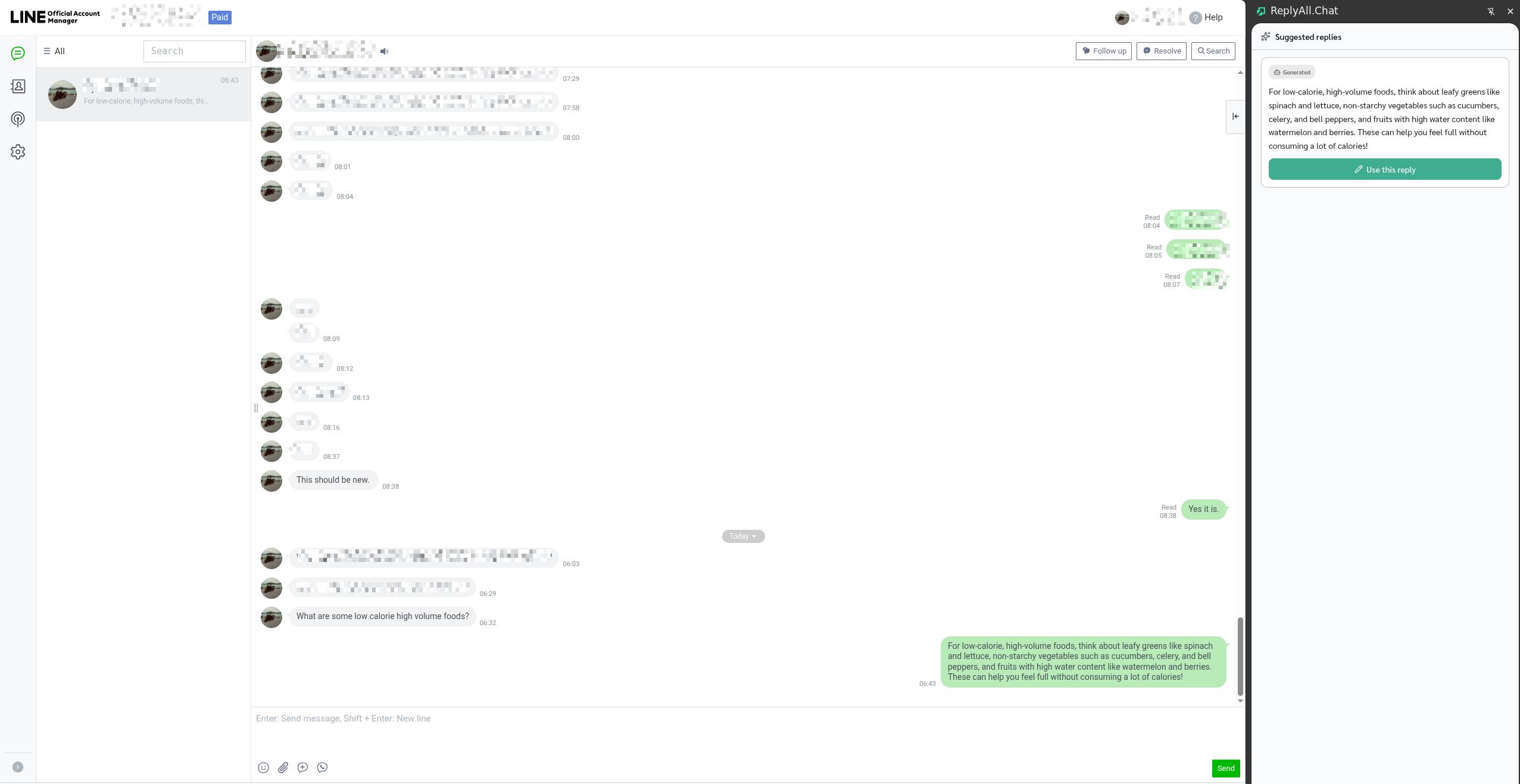
That’s exactly what a browser extension does. It runs in the chat.line.biz tab your team already has open, captures messages as they arrive, and surfaces the CRM’s intelligence — AI suggestions, customer notes, smart canned responses — right next to the existing chat UI.
Concretely, with ReplyAll installed as a Chrome extension on chat.line.biz:
- Day 1: install the extension. Sign in with the same Google account as your dashboard. AI-suggested replies start appearing in a side panel for every incoming message — while your team keeps working in chat.line.biz exactly as before.
- Week 1: move your most active product line or VIP segment to the ReplyAll dashboard. The rest of your team stays in chat.line.biz with the extension.
- Month 3: more conversations live in the ReplyAll dashboard, but the long tail of historical chats remains accessible inside chat.line.biz with extension support.
- Whenever you’re ready: flip the LINE webhook to ReplyAll fully. Nothing breaks. The extension keeps working as a fallback.
There’s no migration day. There’s no “go-live” weekend. There’s no point where the team has to choose between the old tool and the new one.
Why most CRMs for LINE can’t do this
A multi-chat platform that requires the LINE Messaging API webhook to be pointed at its server is, by design, mutually exclusive with chat.line.biz. As soon as you redirect the webhook, chat.line.biz stops receiving new messages on the official endpoint. From that moment your team has to be 100% on the new tool — and you’ve lost the ability to search history that lived only in chat.line.biz.
Some platforms try to soften this with read-only “history viewers” or one-way exports. None of them give you operating-grade access — search, replies, attachments, AI context — inside chat.line.biz after migration.
The architectural unlock is treating chat.line.biz itself as a first-class surface. The Chrome extension model means:
| Standard LINE CRM | ReplyAll with extension | |
|---|---|---|
| Switch the LINE webhook? | Required on day one | Optional, on your timeline |
| chat.line.biz still usable? | Yes, but no CRM features | Yes, with full CRM features |
| Historical chats stay searchable? | Only in old tool | Yes, in chat.line.biz forever |
| Team can split (some on dashboard, some on chat.line.biz)? | No | Yes |
| Migration “go-live” risk | High | None |
What you actually get inside chat.line.biz
The Chrome extension isn’t a stripped-down preview of the dashboard. The features that matter while you’re replying to a customer are all there:
- Resource-grounded AI suggestions. Every reply the AI proposes cites the source it was drawn from — a doc you uploaded, a past conversation that matched, or a smart response you saved. The customer gets your real voice and accurate information, not generic AI.
- Learns from your past chats. When the system finds a similar question you’ve answered before, it surfaces how you answered it. Tone stays yours.
- Smart canned responses. Define the answers you give over and over once on the dashboard, and the extension picks them automatically when they fit the question.
- One-click insert. Click a suggested reply and it drops into chat.line.biz’s editor for you to review, edit, and send. The send button is always yours.
These are the same primitives the dashboard offers. There is no second-class experience for operators who haven’t migrated yet.
What to look for if you’re evaluating a CRM for LINE
If you’re shopping for a multi-chat platform and the migration question matters to you — and it should — these are the questions to put to every vendor:
- What happens to my chat.line.biz history the moment I connect to your tool? If the answer is “we read forward from the webhook,” ask how you keep working access to everything before that.
- Can my team continue using chat.line.biz for any reason after switching? Most multi-chat platforms quietly require you to abandon it. A few don’t.
- Is there a fallback path if your platform goes down? With chat.line.biz still in the loop, your team can always reply directly. With a webhook-only CRM, downtime cuts off the customer.
- Do I get the same AI quality wherever I’m replying? A “lite” experience in chat.line.biz is not the same as full feature parity.
- What’s the data ownership story? Can you export everything, anytime, and is that promise written into the privacy policy?
The right answer to all of these doesn’t lock you in. It earns your migration.
Frequently asked questions
Can the extension really capture every incoming message?
Yes — chat.line.biz internally uses a streaming API to push new messages to the page. The ReplyAll extension observes that stream as messages arrive and forwards them to the same backend that powers the dashboard.
Does the extension send messages on my behalf?
No. The extension only fills the chat editor with a suggested reply. The actual send button click is always yours. This is intentional — operators stay in control of the final wording.
Is my data safe?
The extension communicates only with chat.line.biz, the LINE streaming API, and the ReplyAll backend. It does not access other websites, browsing history, or local files. The only thing stored locally is your authentication token. Full disclosure is in our privacy policy.
What if I want to switch back?
Uninstall the extension and your team is back to plain chat.line.biz, no data lost. Disconnect the LINE Official Account from ReplyAll and the webhook (if you flipped it) reverts to LINE’s defaults. There is no contractual or technical lock-in.
How long does setup take?
Under five minutes. Install from the Chrome Web Store, click “Sign in with Google,” and the side panel starts producing suggestions on the next incoming message.
The takeaway
The reason large LINE accounts stay on chat.line.biz longer than they should isn’t loyalty to the tool. It’s the very real fear of leaving years of customer history behind in a place no other CRM can reach. That fear is justified for almost every multi-chat platform on the market.
A Chrome extension that operates inside chat.line.biz — capturing new messages, surfacing AI replies, and respecting the chat history that already lives there — is the only architecture that lets a serious LINE business migrate at its own pace. No go-live day. No lost conversations. No team split between old and new tools.
If migration is the thing that’s been holding you back, it doesn’t have to anymore. Install the extension, keep working in chat.line.biz, and decide when — or whether — to move the rest.